![[slide:title]](/static/upload/other/20260512/1778551853592214.webp)
![[slide:title]](/static/upload/other/20260512/1778551954982306.webp)
Time:2026-05-19 Form:本站
How to Match Implants and Prosthetic Components: A Practical Guide for Clinics, Labs, and Distributors
Matching implants and prosthetic components is one of the most important steps in restorative implant dentistry. A dental implant may be placed successfully in bone, but the final clinical result still depends heavily on whether the abutment, screw, coping, scan body, analog, healing component, and final prosthesis are correctly matched to the implant system.
For dentists, dental labs, distributors, and implant product buyers, this topic is not only clinical. It is also operational. A mismatch can lead to screw loosening, poor seating, inaccurate digital impressions, prosthetic misfit, delayed delivery, inventory confusion, and even implant failure in severe cases. In contrast, a well-matched implant-prosthetic workflow can reduce chairside adjustment, simplify communication between clinic and lab, and improve long-term restorative stability.
This guide explains how to match implants and prosthetic components correctly, what details matter most, and how clinics, labs, and distributors can build a more reliable component selection system.
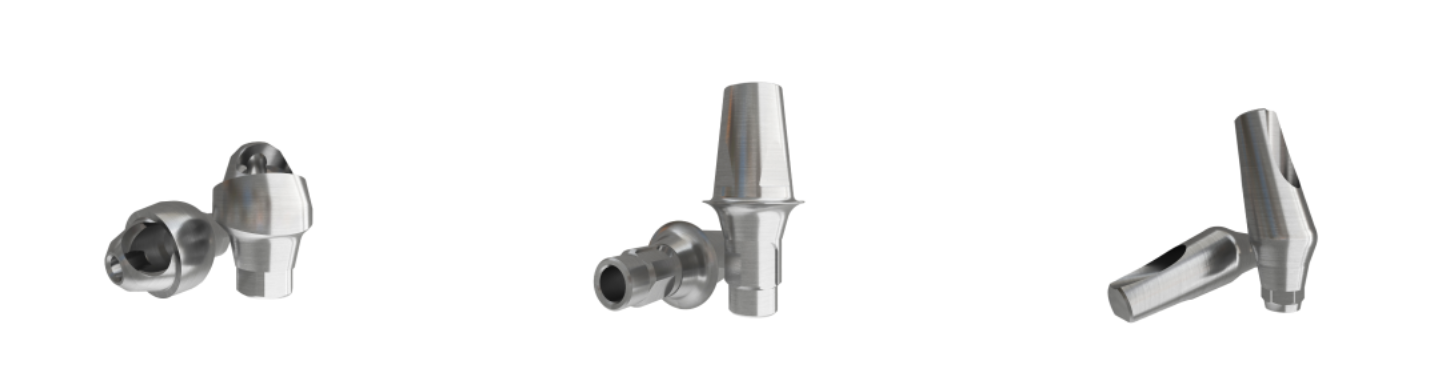
Dental implants are not standalone products. They are part of a complete restorative system. The implant body, prosthetic connection, abutment, screw, impression component, scan body, analog, and restoration must work together as a precise mechanical unit.
When components are not matched correctly, the problem may not appear immediately. Sometimes the prosthesis seems to fit at first, but small differences in connection geometry, screw design, platform size, or emergence profile can create long-term complications.
Common problems caused by poor component matching include:
l Abutment not fully seating on the implant
l Screw loosening after loading
l Micro-movement at the implant-abutment interface
l Incorrect scan body positioning
l Poor crown emergence profile
l Open margins or prosthetic misfit
l Wrong screw channel angulation
l Fracture of prosthetic screws
l Difficulty removing or replacing components later
For B2B implant buyers and distributors, component compatibility is also a business issue. If a product line lacks clear compatibility information, customers may hesitate to purchase. Clinics and labs want systems that are easy to identify, easy to restore, and supported by reliable prosthetic options.
Many people start by looking at implant diameter, but diameter alone is not enough. Two implants may both be 4.0 mm in diameter, but they may use completely different prosthetic connections.
The first thing to identify is the implant connection. After that, the platform size and prosthetic interface should be confirmed.
A safe matching process usually follows this order:
1. Identify the implant brand or system.
2. Confirm the connection type.
3. Confirm the platform size.
4. Check the implant diameter and prosthetic platform relationship.
5. Select the correct abutment, screw, impression coping, scan body, or multi-unit component.
6. Confirm the recommended torque value according to the manufacturer’s instructions.
7. Verify seating clinically, radiographically, or digitally.
This order matters because the prosthetic connection controls how the component locks into the implant. The platform controls the size of the restorative interface. Diameter supports the selection process, but it should not be used as the only matching criterion.
The most reliable way to match prosthetic components is to know the exact implant system. This includes the implant brand, implant line, connection design, platform size, and sometimes even the implant generation.
For example, large implant companies may have multiple systems under one brand. A single brand may offer bone-level implants, tissue-level implants, conical connection implants, external hex implants, and narrow-platform systems. The prosthetic parts are not always interchangeable between these systems.
Clinics and labs should collect as much information as possible before selecting components:
l Implant brand
l Implant model or series
l Implant diameter
l Implant length
l Platform size
l Connection type
l Implant placement date
l Packaging label or patient implant passport
l Radiographic appearance
l Previous prosthetic component used
For distributors, this is why clear product labeling and compatibility charts are essential. A customer should not need to guess whether a transfer coping, scan body, or abutment fits a specific implant platform.
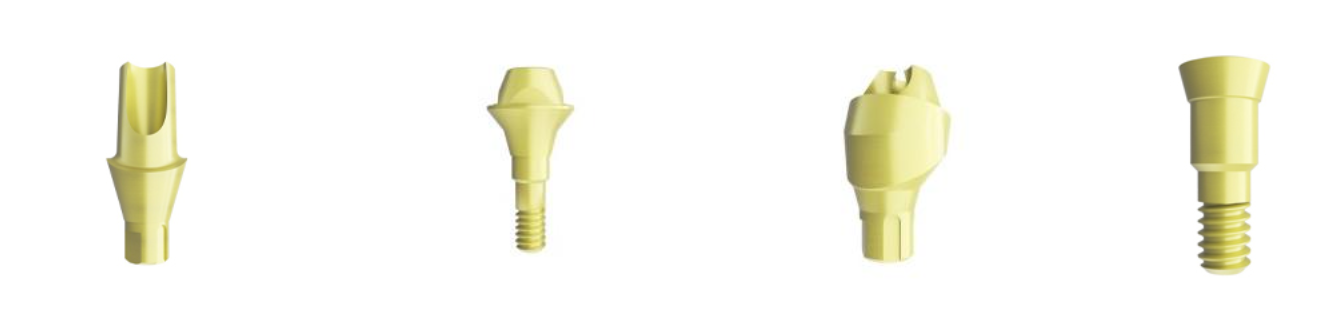
The implant connection is the mechanical interface between the implant body and the prosthetic component. It determines how the abutment seats, how rotation is controlled, how force is distributed, and how stable the restoration may be under function.
External hex implants use a hexagonal structure on top of the implant platform. This design has a long history and is still used in many markets.
External hex systems are often easy to recognize, but they can be more sensitive to screw joint stability and prosthetic accuracy. When matching components, the hex dimension, platform diameter, and screw design must all be correct.
Internal hex connections place the hexagonal anti-rotation feature inside the implant. This design generally provides a deeper connection than external hex and is widely used in modern implant systems.
For prosthetic matching, internal hex does not mean universal compatibility. Different systems may have similar-looking internal hex connections but different depth, taper, screw thread, platform geometry, or indexing design.
Conical connections use a tapered internal interface between the implant and abutment. They are designed to improve mechanical stability and reduce micro-movement at the interface.
However, conical connections require very precise matching. Even small differences in taper angle, indexing, or screw design can prevent full seating or create stress concentration. Components that look visually similar may not be clinically safe to interchange.
Some implant systems use proprietary internal geometries. These designs may improve anti-rotation, indexing, or prosthetic orientation, but they also require exact component matching.
For clinics and distributors, proprietary systems can increase dependency on original components. For labs, they require careful identification before ordering scan bodies, analogs, or titanium bases.
Platform size refers to the prosthetic interface size of the implant. It is often described as narrow platform, regular platform, wide platform, or by exact millimeter dimensions.
The platform is especially important because it affects the fit of:
l Healing abutments
l Impression copings
l Scan bodies
l Temporary abutments
l Final abutments
l Titanium bases
l Multi-unit abutments
l Prosthetic screws
A narrow implant may use a narrow platform, but not always. Some implant systems use platform switching, where the prosthetic component is slightly narrower than the implant body. This can help shape soft tissue and may support crestal bone maintenance, depending on the system design and clinical case.
Because of this, matching based only on implant diameter can be risky. The implant diameter tells you the size of the implant body. The platform tells you the size of the restorative interface.
The prosthetic screw is often underestimated. Many screw-related complications happen because the wrong screw was used, reused too many times, over-tightened, under-tightened, or matched with an incompatible abutment.
When matching screws, check:
l Screw diameter
l Thread design
l Screw length
l Head shape
l Screwdriver type
l Recommended torque
l Compatibility with the abutment and implant
l Whether the screw is for temporary or final restoration
A screw that appears to engage may still be incorrect. If the screw head does not seat properly inside the abutment, the preload may be unstable. If the thread is not correct, it may damage the implant’s internal thread. If the length is wrong, the screw may not fully engage or may bottom out.
Clinics and labs should avoid mixing screws from uncertain sources unless compatibility has been clearly verified. Distributors should also provide screw specifications clearly, because screws are small components but high-risk items.
In traditional workflows, impression copings transfer the implant position to a stone model. In digital workflows, scan bodies transfer the implant position to CAD software. Both require accurate matching.
A scan body must match:
l Implant connection
l Platform size
l Library file
l Scan body height
l Scan body design
l Screw type
l Digital workflow system
One common mistake is assuming that a scan body physically fitting into an implant means it is digitally correct. This is not always true. The scan body must also correspond to the correct CAD library. If the wrong library is selected, the restoration may be designed on incorrect geometry even if the scan looked clean.
For labs, this is a major source of hidden error. The intraoral scan may look acceptable, but the final crown or bridge may not seat properly because the digital component library did not match the physical implant connection.
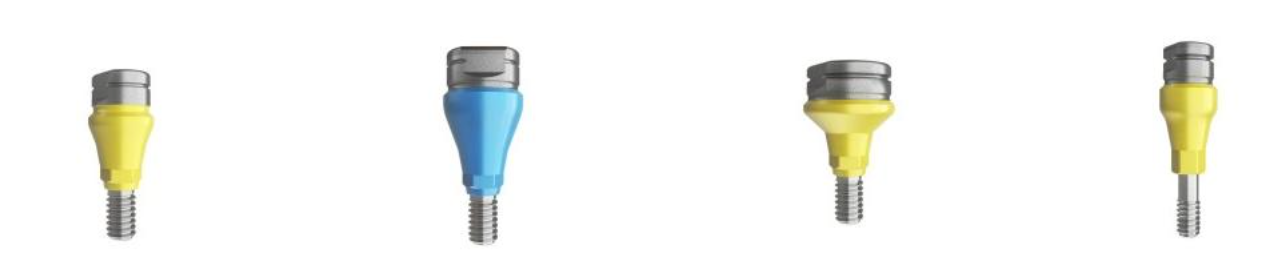
After the implant and platform are identified, the next step is selecting the appropriate abutment type. The choice depends on restorative design, soft tissue conditions, angulation, esthetic needs, occlusion, and whether the case is single-unit or multi-unit.
Stock abutments are prefabricated and commonly used for standard cases. They are cost-effective and easy to order, but they may not always provide ideal emergence profile or margin position.
They are suitable when implant angulation is favorable and tissue height is predictable.
Custom abutments are designed for the patient’s tissue contour and restorative plan. They can improve emergence profile, crown support, and margin placement.
Custom abutments are often preferred in esthetic zones or complex cases, but they require accurate scanning, correct libraries, and reliable milling or manufacturing.
Titanium bases are commonly used in CAD/CAM restorations. They connect the implant to a milled zirconia, lithium disilicate, or hybrid ceramic crown.
When matching a Ti base, the connection, platform, gingival height, cementation height, anti-rotation design, and library must all be correct.
Multi-unit abutments are often used for full-arch restorations, angled cases, and screw-retained bridges. Matching multi-unit components requires attention to platform, angle, gingival height, screw system, impression coping, scan body, and prosthetic cylinder.
For distributors and implant suppliers, multi-unit compatibility is very important because full-arch workflows require a complete ecosystem of parts.
Component | What Must Match | Common Risk If Incorrect |
Healing abutment | Platform, connection, gingival height, diameter | Poor soft tissue contour or incomplete seating |
Impression coping | Platform, connection, transfer type | Inaccurate model or restoration misfit |
Scan body | Platform, connection, CAD library, screw | Digital design error or wrong restoration position |
Temporary abutment | Platform, connection, screw, emergence profile | Loosening or poor provisional contour |
Final abutment | Platform, connection, gingival height, angulation | Crown misfit, screw loosening, esthetic issues |
Ti base | Platform, connection, library, cementation height | Poor crown seating or incorrect digital workflow |
Prosthetic screw | Thread, length, head design, torque protocol | Screw loosening, thread damage, fracture |
Analog / digital analog | Platform, connection, model system | Inaccurate printed or stone model |
A common question for clinics, labs, and distributors is whether compatible components can be used instead of original brand components.
There is no simple answer. It depends on the quality of the component, the precision of manufacturing, the documentation available, and the risk tolerance of the clinical workflow.
Original components are made by the implant brand for its own implant system. They usually provide the clearest compatibility and documentation. For high-risk cases, many clinicians prefer original parts because the system has been validated as a complete solution.
However, original components may be expensive, less flexible, or less available in certain markets.
Compatible components are manufactured to fit existing implant systems. They can be useful for distributors, labs, and clinics that need broader availability, cost control, or flexible restorative options.
But compatible does not mean “roughly similar.” A reliable compatible component must match the critical geometry precisely and should come from a manufacturer with strong machining control, inspection systems, and clear compatibility information.
For example, manufacturers such as RE-TECH focus on implant systems and prosthetic component matching from a production perspective, where connection accuracy, screw fit, platform identification, and consistent tolerances are key considerations. For B2B buyers, this type of compatibility support can reduce ordering confusion and help distributors build a more complete implant product line.
The key is not whether a component is original or compatible. The key is whether it is accurately matched, well manufactured, clearly documented, and suitable for the clinical indication.
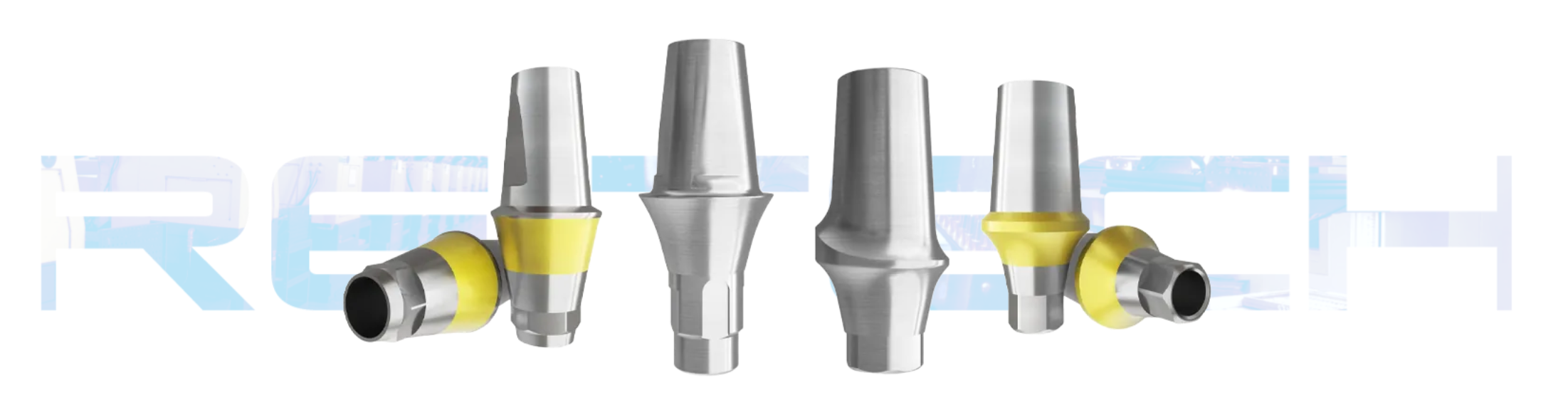
Implant-prosthetic mismatch often happens because of communication gaps, not because clinicians or technicians lack knowledge. A clinic may know the implant brand but forget the platform. A lab may receive a scan body but not know which library was used. A distributor may receive an order for “regular platform” without knowing the exact implant system.
To reduce errors, clinics and labs should build a standard matching checklist.
Recommended Matching Checklist
Before ordering or using a prosthetic component, confirm:
1. What implant system is in the patient’s mouth?
2. What is the implant connection type?
3. What is the platform size?
4. Is the restoration single-unit, bridge, or full-arch?
5. Is the restoration screw-retained or cement-retained?
6. What gingival height is needed?
7. Is the implant angulated?
8. What screw and torque value are required?
9. Is the scan body matched to the CAD library?
10. Has the component fully seated before final tightening?
This checklist is especially useful for multi-location clinics, dental laboratories, and distributors handling different implant systems.
Digital dentistry has made implant restoration faster, but it has also introduced new matching risks. In a digital workflow, the physical and digital components must match each other.
The implant in the mouth must match the scan body. The scan body must match the CAD library. The CAD library must match the Ti base or abutment. The final restoration must match the selected component.
If any link is wrong, the final restoration may fail to seat properly.
A safe digital workflow should include:
l Correct scan body selection
l Proper scan body tightening
l Clear scan body surface visibility
l Correct CAD library selection
l Matching Ti base or abutment design
l Verification of restoration fit before delivery
l Clear communication between clinic, lab, and supplier
For implant manufacturers and distributors, this means product support should not stop at the implant body. A competitive implant system should include scan bodies, analogs, Ti bases, healing abutments, impression copings, screws, and documentation that makes digital restoration easier.
Even when the implant system is correctly identified, the final component choice depends on clinical conditions.
Gingival height affects abutment selection. If the abutment collar is too short, the margin may be too deep and difficult to clean. If it is too tall, esthetics and prosthetic design may be compromised.
Angled implants may require angled abutments, custom abutments, or multi-unit abutments. For screw-retained restorations, screw channel position is critical.
Anterior restorations require better emergence profile and margin control. Posterior restorations require strength, occlusal stability, and screw joint reliability.
Single-unit restorations require anti-rotational components. Bridge and full-arch restorations often use non-engaging components or multi-unit systems.
Cement-retained restorations may be easier in some angulated cases, but cement residue can create biological risk. Screw-retained restorations are retrievable, but require correct screw channel design.
For distributors, clinics, and labs, the supplier’s ability to support component matching is just as important as price.
A reliable supplier should provide:
l Clear compatibility charts
l Accurate platform identification
l Stable machining tolerances
l Consistent screw quality
l Multiple prosthetic options
l Digital workflow support
l Packaging with traceable product codes
l Technical support for component selection
l Reliable batch-to-batch consistency
Low-cost components may look attractive, but if the connection fit is unstable or documentation is unclear, the real cost may appear later through remakes, chairside adjustment, or customer complaints.
This is why many B2B buyers evaluate implant systems as a complete restorative ecosystem, not just as individual implants. A strong implant product line should help the customer restore cases confidently and repeatedly.
RE-TECH’s product positioning is relevant here because many buyers are not only looking for implant bodies, but also for practical prosthetic compatibility, OEM flexibility, and component support that can help distributors serve clinics more efficiently.
Implant diameter is not enough. Always confirm connection and platform.
Two internal connections may look similar but have different geometry.
Incorrect screws can damage internal threads or cause unstable preload.
In digital workflows, the scan body and library must match exactly.
A component may appear seated visually but still have a small gap. Radiographic confirmation is helpful in many cases.
Compatible components should be supported by clear specifications, not guesswork.
A posterior implant crown requires more than choosing an abutment that “fits.”
The clinic or lab should first confirm the implant system and platform. Then the restorative plan should be selected: screw-retained or cement-retained. If digital design is used, the correct scan body and CAD library must be chosen. If a Ti base is used, the Ti base height, gingival height, and anti-rotation design must match the case. The correct screw should be used and tightened according to the manufacturer’s torque recommendation.
Finally, the restoration should be checked for passive fit, proximal contact, occlusion, screw access position, and cleanability.
This process may sound detailed, but it prevents many common complications. In implant dentistry, small interface errors can become large clinical problems.
Full-arch cases are more complex because multiple implants must work together as one prosthetic system.
The clinician may use multi-unit abutments to correct angulation and create a restorative platform. Each multi-unit abutment must match the implant platform and connection. The angle, gingival height, prosthetic screw, scan body, temporary cylinder, and final cylinder must all be selected correctly.
The lab must know whether the components are engaging or non-engaging, which scan bodies were used, and which digital libraries correspond to the selected multi-unit system.
For full-arch cases, component matching is not just a detail. It is the foundation of passive fit.
No. Implant diameter alone is not enough. You must confirm the implant system, connection type, platform size, screw design, and restorative indication. Two implants with the same diameter may use completely different prosthetic components.
Compatible components can be used when they are accurately manufactured, properly documented, and matched to the correct implant system. The key is precision and verification. Components should not be selected only because they look similar.
The implant connection is usually the first and most important factor. After that, the platform size, screw type, gingival height, and restorative design must be confirmed.
A scan body transfers implant position into digital software. If the wrong library is selected, the software may design the restoration based on incorrect geometry. This can cause poor seating or prosthetic misfit.
The wrong screw may loosen, fracture, damage the implant’s internal thread, or fail to create proper preload. Always use the screw specified for the implant and abutment system.
Platform switching means using a prosthetic component that is slightly narrower than the implant platform. It is used in some implant systems to help manage the implant-abutment interface and soft tissue profile.
No. Engaging components have anti-rotation features and are usually used for single crowns. Non-engaging components are often used for bridges or full-arch restorations where multiple implants are connected.
Distributors should provide clear compatibility charts, product codes, platform labels, screw information, and technical support. They should also work with manufacturers that maintain consistent tolerances and complete prosthetic component systems.
Original components are often the safest choice when documentation and availability are strong. However, high-quality compatible components may also be used when compatibility is clearly verified and the supplier provides reliable technical information.
The lab should receive the implant brand, system, platform, connection type, scan body information, CAD library, restoration type, gingival height requirement, screw-retained or cement-retained preference, and any clinical photos or radiographs that help confirm the case.
Matching implants and prosthetic components requires a systematic approach. The safest method is to identify the implant system, confirm the connection type, verify the platform size, select the correct screw and restorative component, and ensure that physical components match the digital workflow.
For clinics, this reduces complications and improves restorative predictability. For dental labs, it reduces remakes and communication errors. For distributors and B2B buyers, it improves customer confidence and makes an implant product line easier to sell and support.
The future of implant dentistry is not only about implant design. It is also about restorative simplicity, component availability, digital compatibility, and reliable system-level support. Buyers who understand implant-prosthetic matching can make better purchasing decisions, reduce risk, and build stronger long-term relationships with clinics and labs.